25 Best Gemini AI Prompts to Enhance Image Quality for Sharp and High‑Resolution Results

25 Best Gemini AI Prompts to Enhance Image Quality for Sharp and High‑Resolution Results

2 months ago Hunzala Asif Business, Creative, Nature, People, Places

Are your images falling short of perfection? Low-quality visuals can truly impact your message. However, Gemini AI offers incredible solutions. Today, we’re sharing 25 powerful prompts. These will transform your photos into sharp, high-resolution masterpieces.

1. Enhance Image Quality with Ultra‑Sharp Details

Do you crave incredible clarity in your photos? This prompt is your secret weapon. It focuses on bringing out every tiny detail. Moreover, it ensures your images look professionally refined.

Enhance Image Quality with Ultra‑Sharp Details

Prompt #1

Enhance the image quality to achieve ultra-sharp details. Focus on bringing out intricate textures and fine lines without introducing artifacts. The final output should have exceptional clarity and a high level of visual fidelity. Style: hyper-realistic, high-definition photography.

2. Gemini AI Prompt for HD Image Upscaling

Sometimes, you need a larger image. However, simply stretching a photo often leads to blurriness. This prompt expertly upscales your visuals. It maintains stunning HD quality throughout the process.

Gemini AI Prompt for HD Image Upscaling

Prompt #2

Upscale the provided image to a high-definition (HD) resolution. Ensure that all details are preserved and enhanced, avoiding pixelation or blurring. The final image should appear naturally larger and sharper, suitable for large displays. Target resolution: 1920×1080 pixels or higher.

3. Improve Blurry Photos with AI Image Enhancement

Blurry photos can be incredibly frustrating. This prompt comes to the rescue. It intelligently sharpens soft areas. Furthermore, it restores lost clarity, making your photos usable again.

Improve Blurry Photos with AI Image Enhancement

Prompt #3

Improve the quality of this blurry photo. Apply AI image enhancement to deblur the main subject and sharpen edges. Restore clarity and focus without creating an artificial look. The goal is a clear, crisp image from an originally soft or out-of-focus source.

4. High‑Resolution Image Enhancement Prompt

High resolution is key for impact. This prompt specifically targets resolution improvement. It ensures your images are not just clear but also packed with pixels. Consequently, they look fantastic on any screen.

High‑Resolution Image Enhancement Prompt

Prompt #4

Perform a high-resolution image enhancement. Increase the overall pixel density and detail, ensuring the image is suitable for large-format printing or display. Maintain natural colors and textures while significantly boosting the resolution. Aim for a print-ready quality.

5. Enhance Image Clarity and Sharpness with Gemini AI

Sometimes, images lack that crisp, clear look. This prompt directly addresses that issue. It sharpens edges and boosts overall clarity. You’ll notice an immediate difference in visual impact.

Enhance Image Clarity and Sharpness with Gemini AI

Prompt #5

Enhance the image to significantly improve clarity and sharpness. Focus on defining edges and increasing visual crispness without over-sharpening. The image should appear more transparent and detailed, with improved contrast in key areas. Style: clean, precise visuals.

6. AI Prompt to Restore Low‑Quality Images

Do you have old, low-quality photos? Don’t discard them! This prompt specializes in restoration. It breathes new life into faded or pixelated images. Watch them transform into vibrant visuals.

AI Prompt to Restore Low‑Quality Images

Prompt #6

Restore this low-quality image. Address issues like pixelation, compression artifacts, and general degradation. Improve color accuracy, sharpness, and overall visual integrity. The goal is to bring the image to a modern, usable quality standard. Style: gentle restoration, natural enhancement.

7. Professional Photo Quality Enhancement with Gemini AI

Achieving a professional look is crucial. This prompt elevates your photos to that level. It applies a suite of enhancements. Consequently, your images will exude polished, high-end quality.

7. Professional Photo Quality Enhancement with Gemini AI

Prompt #7

Perform a professional photo quality enhancement. Optimize lighting, color balance, and dynamic range. Sharpen details appropriately and reduce noise for a clean, polished appearance. The final image should meet industry standards for high-quality photography. Style: commercial-grade, refined aesthetics.

8. Enhance Image Quality with Natural Textures

Details are important, but so is realism. This prompt enhances quality while preserving natural textures. It avoids an artificial, overly smooth look. Your images will feel authentic and rich.

8. Enhance Image Quality with Natural Textures

Prompt #8

Enhance the image quality by focusing on natural textures. Improve sharpness and detail in elements like skin, fabric, or foliage, ensuring the textures remain realistic and tactile. Avoid over-smoothing or artificial sharpening. The image should feel organic and rich in detail. Style: naturalistic, tactile imagery.

9. Gemini AI Prompt for Noise Reduction and Clean Images

Grainy photos can distract viewers. This prompt tackles image noise head-on. It intelligently smooths out imperfections. The result is a clean, clear, and professional-looking image.

Prompt #9

Apply advanced noise reduction to this image. Remove digital grain and artifacts while preserving essential details and sharpness. The output should be a clean, smooth image with improved clarity and color fidelity, free from visual distractions. Style: pristine, polished visuals.

10. Improve Image Details Without Over‑Sharpening

Over-sharpening can ruin an image. It creates harsh, unnatural edges. This prompt carefully enhances details. It ensures a crisp look without any artificiality.
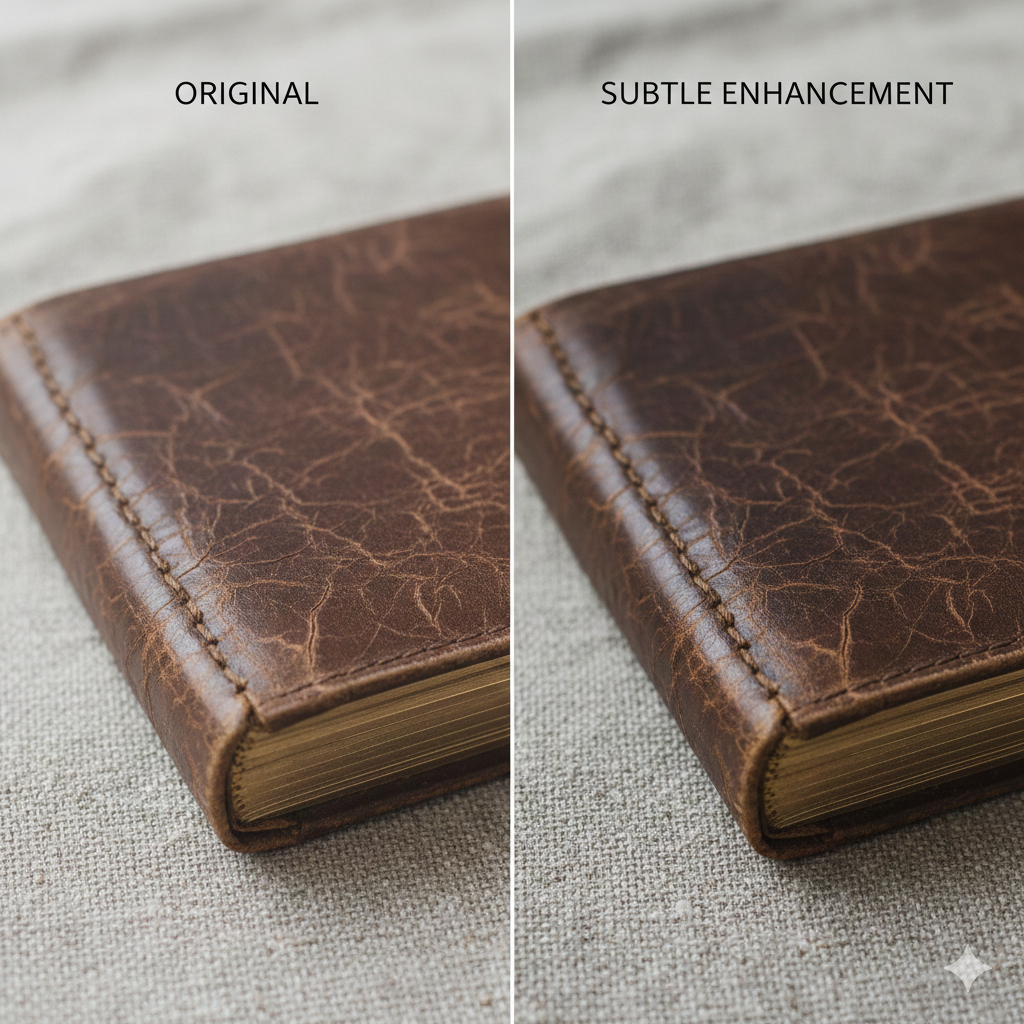
Improve Image Details Without Over‑Sharpening

Prompt #10

Improve the image details without over-sharpening. Enhance subtle textures and fine elements gently, maintaining a natural appearance. Avoid halos or harsh edges. The goal is a detailed yet soft and realistic image. Style: subtle enhancement, organic detail.

11. AI Image Enhancement Prompt for Social Media Photos

Social media demands eye-catching visuals. This prompt optimizes your photos specifically for platforms. It ensures they look vibrant and clear. Get ready for more likes and shares!

AI Image Enhancement Prompt for Social Media Photos

Prompt #11

Enhance this image for social media platforms. Optimize for vibrant colors, good contrast, and clear details that stand out on small screens. Ensure the image is engaging and visually appealing, suitable for quick consumption. Style: bright, impactful, shareable.

12. Enhance Portrait Image Quality with Realistic Skin Texture

Portraits require a delicate touch. This prompt enhances skin texture beautifully. It smooths imperfections while retaining natural details. The result is a flattering, realistic portrait.

Enhance Portrait Image Quality with Realistic Skin Texture

Prompt #12

Enhance the quality of this portrait image. Focus on realistic skin texture, smoothing blemishes gently while preserving pores and natural skin details. Improve eye sharpness and overall facial clarity. The portrait should appear natural, flattering, and high-definition. Style: professional portraiture, natural beauty.

13. Gemini AI Prompt for 4K‑Style Image Enhancement

Want your images to look truly cinematic? This prompt brings 4K quality to your visuals. It drastically increases resolution and detail. Prepare for stunning, ultra-high-definition results.

Gemini AI Prompt for 4K‑Style Image Enhancement

Prompt #13

Apply 4K-style image enhancement to this visual. Upscale and refine details to achieve an ultra-high-definition appearance. Boost sharpness, contrast, and color depth to mimic professional 4K cinematography. The image should be rich in detail and incredibly crisp. Style: cinematic 4K, ultra-HD.

14. Boost Image Quality with Balanced Lighting and Contrast

Poor lighting can ruin a great photo. This prompt fixes common lighting issues. It balances shadows and highlights. Moreover, it optimizes contrast for a perfectly exposed image.

Boost Image Quality with Balanced Lighting and Contrast

Prompt #14

Boost the image quality by optimizing lighting and contrast. Ensure a balanced exposure, bringing out details in both shadows and highlights. Enhance overall dynamic range for a more vibrant and visually appealing image. Avoid crushed blacks or blown-out whites. Style: balanced, well-exposed photography.

15. AI Prompt to Enhance Old or Compressed Images

Old photos often suffer from degradation. Heavily compressed images also lose quality. This prompt is designed for these challenging cases. It intelligently restores and enhances, bringing them back to life.

AI Prompt to Enhance Old or Compressed Images

Prompt #15

Enhance this old or compressed image. Remove artifacts, reduce noise, and improve overall clarity. Restore faded colors and sharpen details that have been lost due to age or compression. The goal is a significantly improved, clearer version of the original. Style: historical restoration, digital repair.

16. High‑Detail Image Enhancement for Professional Use

Professionals demand impeccable quality. This prompt delivers exactly that. It focuses on maximizing detail and clarity. Use it for presentations, portfolios, or commercial projects.

High‑Detail Image Enhancement for Professional Use

Prompt #16

Perform a high-detail image enhancement suitable for professional use. Maximize sharpness, texture, and fine elements across the entire image. Ensure color accuracy and optimal contrast. The final output must be print-ready and suitable for high-stakes applications. Style: meticulous, professional-grade detail.

17. Gemini AI Prompt for Clear and Crisp Visuals

Sometimes, you just need a straightforward improvement. This prompt focuses on fundamental clarity. It makes your visuals undeniably crisp. Say goodbye to dull, flat images.

Gemini AI Prompt for Clear and Crisp Visuals

Prompt #17

Enhance the image to achieve clear and crisp visuals. Improve overall sharpness and definition without introducing artificiality. Ensure colors are vibrant and details are well-defined. The image should have a fresh, clean, and impactful appearance. Style: vivid, sharp, modern.

18. Enhance Image Resolution While Preserving Details

Increasing resolution can sometimes soften details. This prompt avoids that pitfall. It intelligently boosts resolution. Crucially, it safeguards all the intricate elements within your image.

Enhance Image Resolution While Preserving Details

Prompt #18

Enhance the image resolution while meticulously preserving all existing details. Upscale the image to a higher pixel count without any loss of texture, sharpness, or fine lines. The output should be a larger, high-resolution version that looks identical in quality to the original, only bigger. Style: lossless upscaling, detail preservation.

19. AI Image Quality Enhancement for Product Photos

Product photos need to shine. They drive sales and build trust. This prompt polishes your product images. It makes them look irresistible to potential customers.

AI Image Quality Enhancement for Product Photos

Prompt #19

Enhance the image quality specifically for product photography. Focus on highlighting product features, textures, and colors accurately. Ensure a clean background, optimal lighting, and sharp details that make the product appealing and professional. Style: e-commerce ready, commercial product shot.

20. Enhance Image Quality with Realistic Colors

Color accuracy is vital for realism. This prompt enhances your image colors. It ensures they are vibrant yet true to life. Avoid oversaturated or dull hues with this powerful tool.

Enhance Image Quality with Realistic Colors

Prompt #20

Enhance the image quality by improving color realism. Adjust saturation, hue, and vibrance to make colors pop naturally without being artificial. Ensure skin tones are accurate and landscapes appear true to life. The goal is rich, authentic color rendition. Style: naturalistic color grading, vibrant realism.

21. Gemini AI Prompt for Studio‑Quality Image Enhancement

Dream of studio-quality photos without the cost? This prompt makes it possible. It applies professional-grade enhancements. Get that polished, high-end studio look instantly.

Gemini AI Prompt for Studio‑Quality Image Enhancement

Prompt #21

Apply studio-quality image enhancement. Optimize for perfect lighting, precise focus, and immaculate detail. Remove any imperfections or distractions, ensuring a polished, high-end finish. The image should look like it was captured in a professional studio environment. Style: high-fashion, commercial studio photography.

22. Improve Image Sharpness with Soft Natural Look

Sharpness doesn’t always mean harshness. This prompt finds the perfect balance. It boosts clarity while maintaining a soft, natural aesthetic. Your images will look crisp yet gentle.

Improve Image Sharpness with Soft Natural Look

Prompt #22

Improve image sharpness while maintaining a soft, natural look. Enhance details subtly, avoiding any artificial or aggressive sharpening. The image should appear clear and focused but with a gentle, organic feel. Style: soft focus, natural clarity.

23. AI Prompt to Enhance Image Quality for Thumbnails

Thumbnails are your first impression. They need to be impactful, even when small. This prompt optimizes images for tiny formats. Ensure your thumbnails grab attention every time.

AI Prompt to Enhance Image Quality for Thumbnails

Prompt #23

Enhance the image quality specifically for use as a thumbnail. Ensure key elements are clear and recognizable even at a very small size. Boost contrast and sharpness slightly to make it pop. The image should be impactful and legible in a reduced format. Style: optimized for small screens, high legibility.

24. Advanced Gemini AI Image Enhancement Prompt

Ready for next-level enhancement? This advanced prompt combines multiple techniques. It delivers a comprehensive quality upgrade. Unlock the full potential of your visuals with this powerful tool.

Advanced Gemini AI Image Enhancement Prompt

Prompt #24

Apply advanced Gemini AI image enhancement. Perform multi-faceted optimization including intelligent noise reduction, selective sharpening, dynamic range expansion, and precise color grading. The goal is a holistic improvement across all visual parameters, resulting in a master-quality image. Style: comprehensive, state-of-the-art enhancement.

25. One‑Click Style Gemini AI Prompt to Improve Image Quality

Need quick, impressive results? This prompt is designed for speed and simplicity. It applies a balanced set of enhancements. Get a significant quality boost with minimal effort.

One‑Click Style Gemini AI Prompt to Improve Image Quality

Prompt #25

Improve the image quality with a “one-click” style enhancement. Apply a balanced set of adjustments including moderate sharpening, contrast boost, color correction, and light noise reduction. The output should be a noticeably better quality image with a universally appealing aesthetic. Style: quick professional polish, general improvement.

Share this post

Help others discover useful Gemini image prompts

Related Posts